OSDK Engine is a university project which fullfils our desires of making our own OpenGL C++ graphic engine. It is made by Oriol Marc Clariana Justes and Sergio Almajano Bravo, two students of ESAT in the HND in Computing and Systems Development in Valencia, Spain.
Details
- Platform: Windows.
- Engine: C++, OpenGL 3.x/4.x.
- Duration: 7 months.
- Project: Two programmers discussing every feature and working together.
OSDK Engine Documentation
Content
-
1 Engine Features
- 1.1 Task Manager and DisplayList
- 1.2 Components based system
- 1.3 ChaiScript Implementation
- 1.4 glTF scene loader
- 1.5 Imgui implementation
- 1.6 Multithread
-
2 Implemented techniques
- 2.1 Render to texture
- 2.2 Shadows
-
3 Strategies and Solutions to development problems
-
4 Task distribution among developers
- 4.1 Sergio Almajano Bravo
- 4.2 Oriol Marc Clariana Justes
Engine Features
Task Manager and DisplayList
We create a Task Manager and DisplayList system. Is an easy way to create all the GPU information and all the calls of GPU needed.
Because with this system:
- We have a engine multi-thread safe.
- Is rescalable and can add modifications without change all the code.
- Clear to work with them.
Components based system
Our Engine give support to work with Components System, as done by Unity3D. To make the User-Client experience much better and easy way.
As user you can create this Components:
- Transform Component: Usually all the Nodes has one by default.
- Render Component: Is the way to create some Model o visualize geometrys.
- Light Component: Used to create Lights like Directional, SpotLight or Pointlight.
A Component has this default functions:
node->AddComponent<TransformComponent>();
node->AddComponent<RenderComponent>();
node->AddComponent<LightComponent>();

TransformComponent* trans = node->GetComponent<TransformComponent>();
RenderComponent* render = node->GetComponent<RenderComponent>();
LightComponent* light = node->GetComponent<LightComponent>();

node->HasComponent<TransformComponent>();
node->RemoveComponent<TransformComponent>();
And you can access to the functions and options of each Component like the next example:
TransformComponent* trans = node->GetComponent<TransformComponent>();

trans.set_position( {10.0f, 10.0f, 0.0f} );
trans.set_scale( {1.0f, 1.0f, 1.0f} );

trans.position();
ChaiScript Implementation
ChaiScript is a scripting language designed specifically for integration with C++. It provides seamless integration with C++ on all levels, including shared_ptr objects, functors and exceptions.
For create a Node you can do the next:
global node = CreateNode();
node.setName("YOUR_NODE_NAME");
If you want to create a variable can changed in other function. This variable need to be GLOBAL!
global trans = node.GetTransformComponent();
global render = node.GetRenderComponent();
global light = node.GetLightComponent();
As C++ you can access to the function and options of each Component.
auto position = Vec3();
position.x = 10.0f;
position.y = 10.0f;
trans.set_position(position);
If you need create a Light, you just need do it like the example:
node.AddLightComponent();
global light = node.GetLightComponent();
light.typeOfLight(kLightType_DirectionalLight);
light.typeOfLight(kLightType_SpotLight);
light.typeOfLight(kLightType_PointLight);
The Shaders we can use on our models are:
kShader_default
kShader_texture
kShader_pbr
For load a glTF model in the engine, just need to do:
global node = load_glTF_scene("../data/models/NAME/glTF/GLTF_FILE.gltf", kShader_pbr);
glTF scene loader
Our Engine has support for glTF, which is a royalty-free specification for the efficient transmission and loading of 3D scenes and models by applications.
We choose glTF as our format for 3D scenes and models because is a very efficient way of transfering 3D content over the network. Also because is written in JSON and is very eassy to understand what is its content.
Our way of loading it is simple, we start from the top which is the scene and we go down from there. From all the information you can use we load the elements which follows the red arrows:
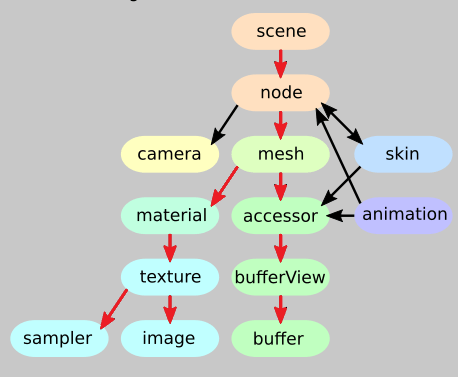
And for loading and showing it is as simple as creating a new Node class instance and equal it to the function "engine->scene->load_glTF_scene" which returns the scene node of the glTF with all its childs with its specific meshes.
Node* Corset = engine->scene->load_glTF_scene("glTF_file_name.gltf");
Corset->setName("Corset");
The final result looks something like this:

Donated by Microsoft for KhronosGroup glTF.
Created by Kays Myers
Imgui implementation
We also Implemented imgui, which is one of the best graphical user interface library for C++.
Our implementation is a very basic one. We have two windows: one is the hierachy window which shows all the nodes in the scenes and its childs.
The other one is the Node Inspector, which shows the information of each node:
- If is active or not
- If it cast Shadows
- The name of the node
- Its Transform Component with its global position rotation and scale.
The Transform Component can be modified in the same window.

Multithread
The engine has a multi-thread system for a better optimization. Our engine work with two simulaneos threads.
- One of the Threads is for GPU render and GPU calculations.
- The second one is CPU calculations and operations.
Implemented techniques
Render to texture
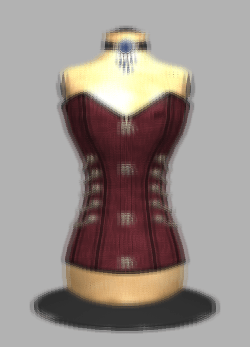
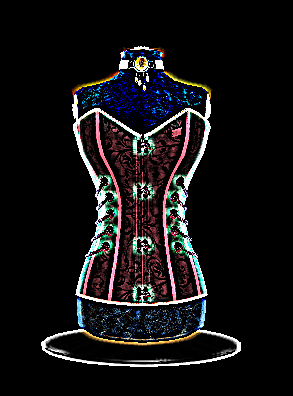
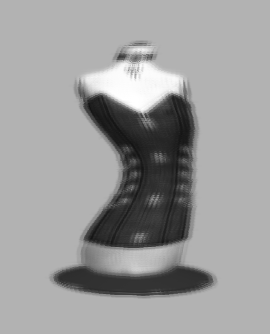
Render to texture is a graphic technic which allows you to render a scene directly to a texture, which can then be used in other rendering operations. This technic uses framebuffer objects as framebuffers to render the scene to a texture.
Its simple, first you bind your framebuffer at the start of the render loop, the you draw you whole scene. After that you unbind the framebuffer your are going to use for rendering into the texture and then you can manipulate the texture by applying different technics into the shader.
Some of the are:
- Blur
- Invert colors
- Greyscale
- Wave
- Edge detection
Shadows
The concept of shadow is inseparable from the concept of light, as you need light in order to cast a shadow. There are many techniques that generate shadows and we use the Shadow Mapping. Is the simple way to do that.
The Shadows work with:
- Directional Light
- SpotLight
Strategies and Solutions to development problems
- One of my biggest problems during the development was the implementation of glTF in our engine. At first I didn´t knew how to start loading the data because I didn´t understand what connections had each element of the glTF hierachy. But when you understand it you want to continue using more of the data that glTF provides you.
Task distribution among developers
Sergio Almajano Bravo
- Shader class
- Texture class
- Render Component
- Render to Texture –> post processing
- glTF loader
- Imgui implementation
- Node class
- Window class
Oriol Marc Clariana Justes
- DisplayList system
- Commands system
- Components system
- ChaiScript implementation
- Light Component
- Transform Component
- Camera class
- gpu class
- gengine class
- Multi-thread implementation
 Sergio Almajano Bravo